 Snapp Market · Order Updates Case Study
Navid Semi · navidsemi.com · 01 / 19
Reducing order cancellations with a post‑checkout redesign
An evidence-led redesign for Snapp Market — Iran's #1 online grocery platform (64% market share, 20M+ users) with 5–10 minute vendor prep times. From support tickets to a shipped, A/B-tested feature.
Freelance Product Designer · Remote, UK
2w Research → 2w UX/UI → 4w Handoff & A/B
1 PM · 2 Engineers · 1 Data Analyst
−38% cancellations · −58% support inquiries · 4-week A/B test
Snapp Market · Order UpdatesNavid Semi · navidsemi.com · 03 / 19
The Problem
No good options — a problem for users & business
15–20%
Order cancellation rate
When users forget items after checkout, three bad choices — the post-checkout journey as it shipped, rebuilt in Figma:
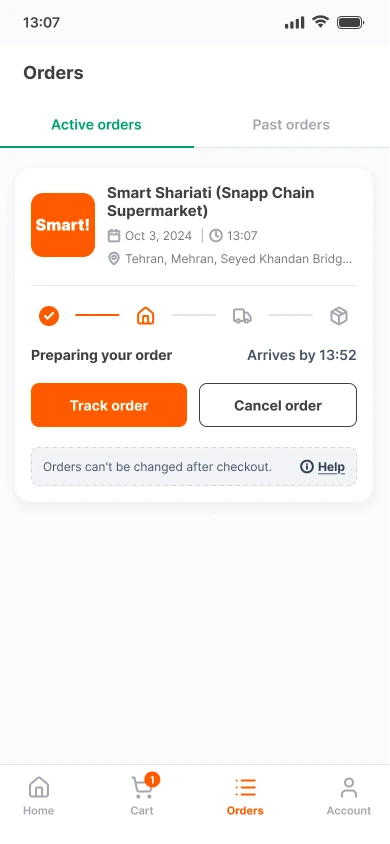
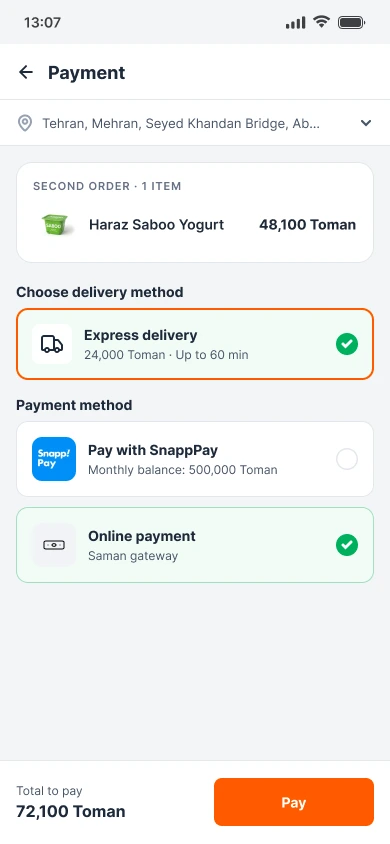
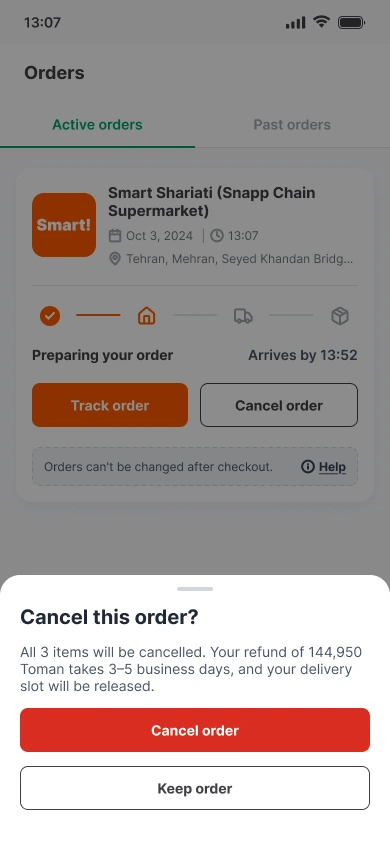
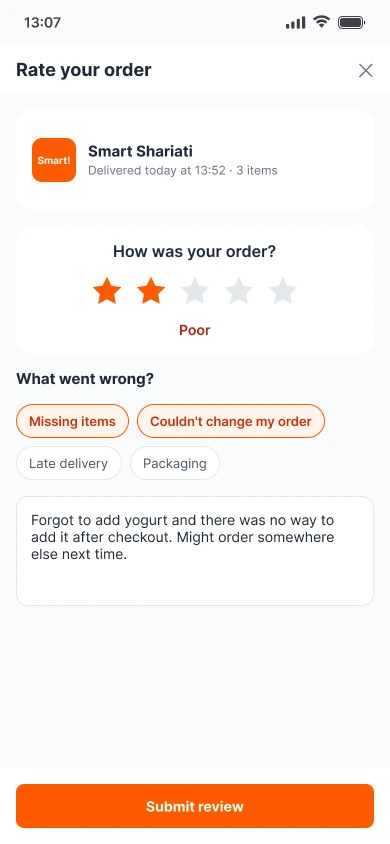
The real question — what customer problem was behind the cancellations, and how do we fix the cause, not the symptom?
Snapp Market · Order UpdatesNavid Semi · navidsemi.com · 04 / 19
Discovery
Looking past the metric to the root cause
Before designing anything, I traced the cancellations back to what customers were struggling with — rather than accepting the existing assumptions.
01
Support tickets
Asked to review the most repetitive customer support tickets: what were customers struggling with again and again?
02
Validated with data
Reviewed the ticket patterns with the Data Analyst to confirm they were a real trend, not a few loud complaints.
03
Journey analysis
Mapped the post-checkout journey to see where the experience broke down — and how that led to cancellations.
04
Root cause
Customers forget items, and the order locks at checkout. Every fix they had cost money, time or trust.
Then I sized it — a survey of 100 users and on-site interviews with 4 vendors, to measure how common the problem was and what operations could support.
Snapp Market · Order UpdatesNavid Semi · navidsemi.com · 05 / 19
Evidence · Author's own user research
Research & Key Insights
Ever forgotten an item?
81%
19% have not. A key pain point — 4 in 5 users have done it.
What do you do about it?
Place a new order36%
Do nothing33%
Cancel & re-order16%
Buy locally11%
Other4%
Shows users are forced into bad choices
How often do you shop online?
41%
Several times a month · 32% once a month · 22% weekly. A habit for most.
Top concern shopping online?
31%
Accurate fulfilment · 30% timely delivery · 23% shipping costs · 13% service charges.
4 in 5 users forget items, but the app gives them no way to fix it. This forces them to pay extra fees, waste time, or give up on the order.
 Snapp Market · Order Updates
Navid Semi · navidsemi.com · 07 / 19
Stakeholder Alignment
How I Changed the Business Team's Mind
01 Why they pushed back
Their initial thought
The business team rejected the idea for three reasons:
- Extra Revenue. "Duplicate orders bring extra delivery fees."
- Too Complex. "Editing will break our fast logistics."
- Low Priority. "Not urgent enough to fix right now."
02 My argument & solution
A safe solution
I pushed back with evidence — support-ticket patterns, survey data and journey analysis — and a safe solution: a 15-minute, "add-only" window.
- Wasted Slots. 1-item orders waste trips meant for big carts.
- Angry Users. Paying twice frustrates users and erodes trust.
- Safe for Logistics. Adding items is simple. The 15-minute limit fits the packing time and doesn't break our workflow.
The result — they accepted my offer. Because the "add-only" rule avoided complex refunds, we moved forward.
Snapp Market · Order UpdatesNavid Semi · navidsemi.com · 08 / 19
Solution Strategy
A 15-minute, add-only editing window
0 MINOrder placed
5 MINVendor prep begins
10 MINPayment settled
15 MINHard cutoff · picking starts
20 MINOut for delivery
Why 15 minutes?
Matches the 5–10 min vendor prep window plus a payment-processing buffer — a hard cutoff before the "picking started" trigger fires.
Why add-only?
Adding is operationally simple; removing means inventory reversal and repacking.
 Snapp Market · Order Updates
Navid Semi · navidsemi.com · 09 / 19
Interaction Design
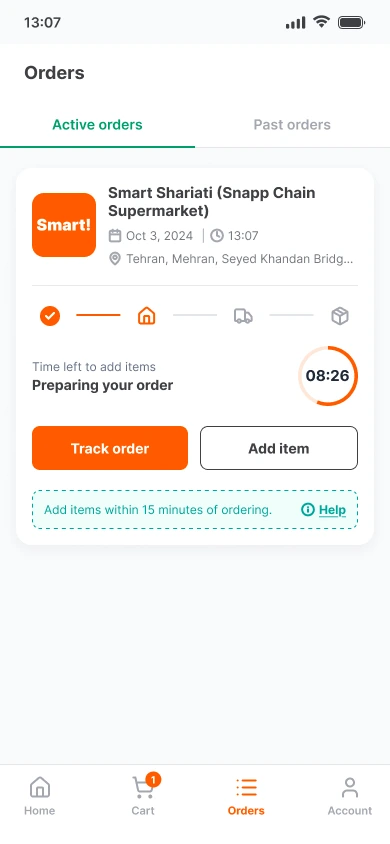
Anatomy of the add-item window
Five decisions on one screen — each one there to keep a rushed customer calm and clear.
5
Window closes before picking
The truck step lights up only after the timer ends — matching vendor prep time.
2
“Time left to add items”
Ties the timer to the action — never mistaken for delivery time.
4
One-line rule + Help
States the 15-minute rule; Help explains why removal isn't possible yet.
5
2
1
3
4
1
Countdown ring
Time left at a glance. A calm, depleting ring — no “1 minute left!” alarm.
3
Add item, not Edit
Add-only by design: one clear action, outlined so Track order stays primary.
Snapp Market · Order UpdatesNavid Semi · navidsemi.com · 10 / 19
Edge Cases & Complex States
Handling Edge Cases
I planned for common problems — and designed the state for each one:
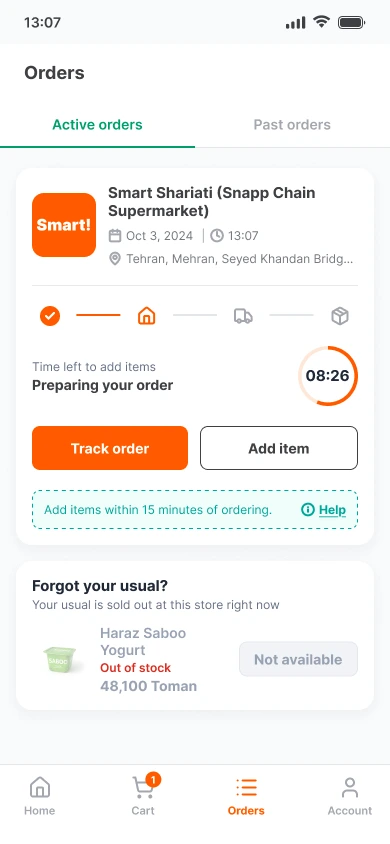
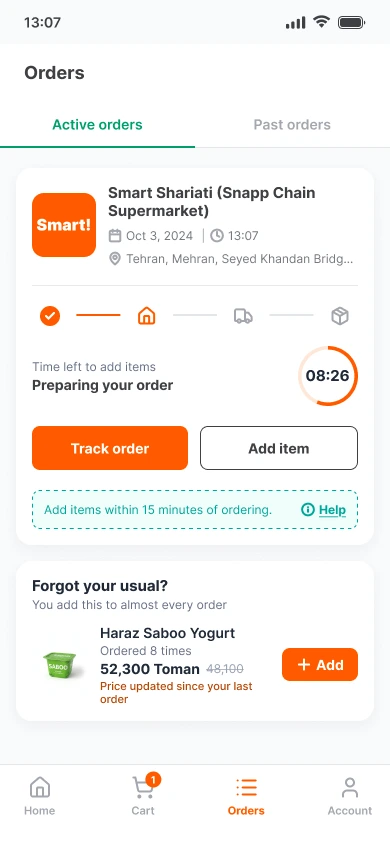
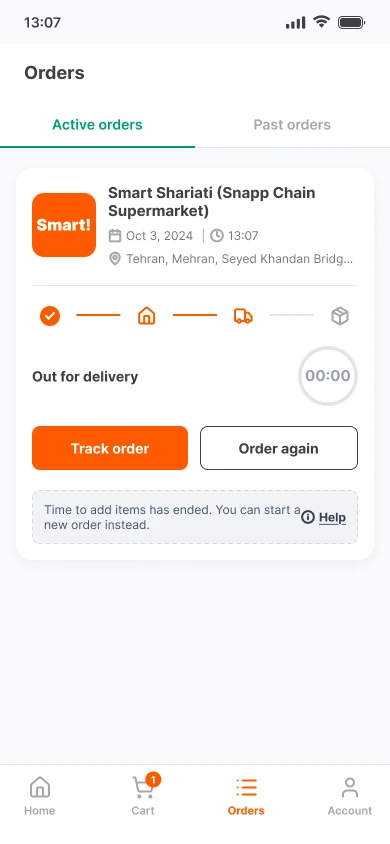
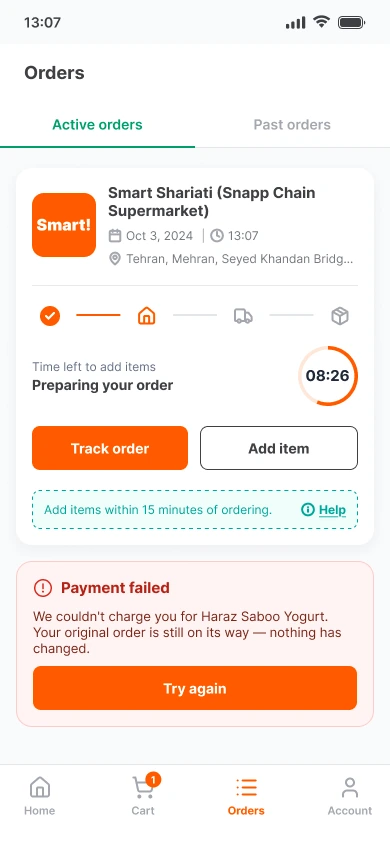
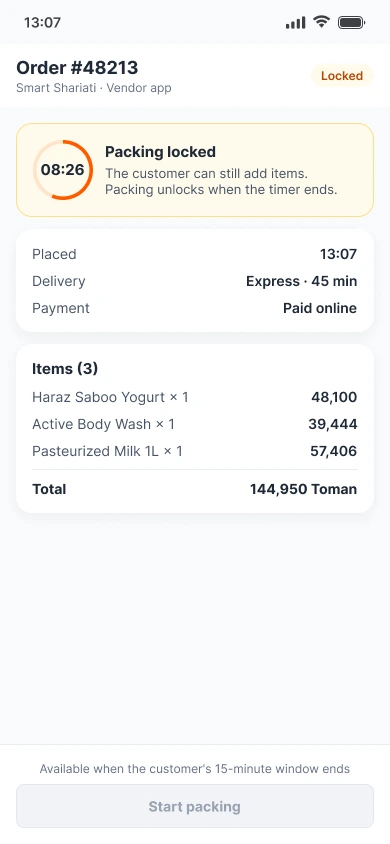
My approach — high-impact, easy problems first; hard ones (like removing items) saved for V2. I worked through every state with engineering to get it shipped.
Snapp Market · Order UpdatesNavid Semi · navidsemi.com · 11 / 19
User Flow
One timer, two apps, every path mapped
Before drawing screens I mapped every branch — the happy path, the four customer edge cases, and the vendor lane that keeps logistics safe.
Order placed
Timer starts15-min add-item window opens
DecisionForgot an item?
Home or OrdersTap Add item
CheckIn stock, same price?
No new delivery feePay for added item only
Same courierAdded to the same order
03 · No time leftRing hits 00:00 → “Order again”
01 · Out of stock“Not available”, button off
02 · Price changedNew price + small note
04 · Payment failsOriginal order kept → Try again
Vendor receives order
05 · Vendor packs earlyPacking locked — countdown shown until the customer's window ends
At 00:00Packing starts
Out for delivery
Window / edge case solved
Failure, order protected
Success
Vendor lane
Snapp Market · Order UpdatesNavid Semi · navidsemi.com · 12 / 19
Before → After
Three bad choices, replaced by one tap
01 · Place a second order
Before
→
After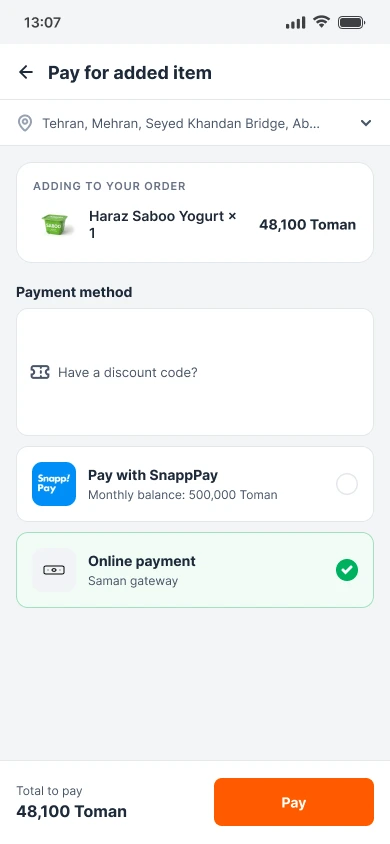
Before72,100 Toman, including a second delivery feeAfter48,100 Toman — joins the same delivery
02 · Cancel & re-order
Before
→
After
BeforeCancel everything, wait 3–5 days for a refundAfterAdd item within 15 minutes — same order, same slot
03 · Give up on the item
Before
→
After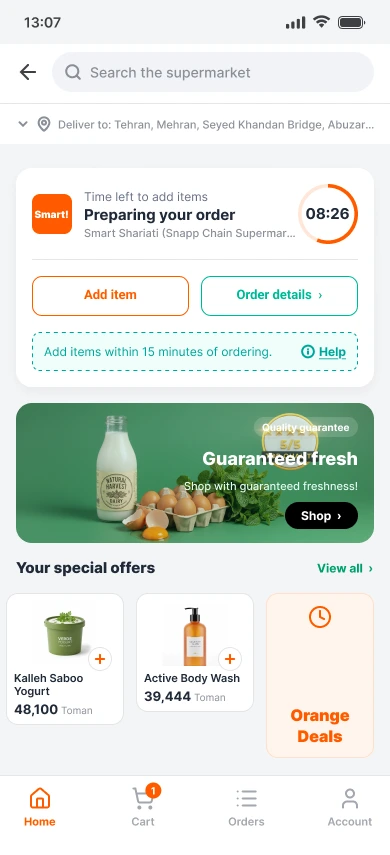
BeforeItem lost, trust eroded, low ratingAfterAdd item is one tap away on Home, where users land
 Snapp Market · Order Updates
Navid Semi · navidsemi.com · 14 / 19
Usability Testing & Iteration
The Pivot: 4x Fewer Misclicks
Version 1 put the add-item window only in the Orders tab. In moderated sessions (n = 10, task: find & edit an order), 1 in 4 users tapped the wrong place first.
So I moved the active order card onto Home — the screen people land on after checkout.
100%Task success
89%CSAT, up from 75%
67.4sAvg. time · 40% faster
Version 1
Version 2
Snapp Market · Order UpdatesROI & Business Impact
One feature.
Four teams
better off.
Every user metric from the A/B test maps to a business lever someone owns.
GrowthSupportFinanceOperations
Navid Semi · navidsemi.com · 17 / 19
User metricBusiness valueWho gains
−38%→Growth
Revenue kept
Fewer cancelled baskets — the whole order stays, not just the forgotten item.
−58%→Support
Lower support cost
The most repetitive, low-complexity requests disappeared from the queue.
+15%→Finance
Revenue captured
Forgotten items added to the basket instead of being abandoned.
+22%→Growth
Higher lifetime value
More customers came back to order again within 30 days.
Delivery slots freed up
No more one-item duplicate orders taking up couriers — delivery slots stay free for the big baskets that need them.
OperationsVendors back in control
No more adding forgotten items by hand for cash — every addition is paid in the app, and packing waits for the timer.
VendorsSnapp Market · Order UpdatesNavid Semi · navidsemi.com · 18 / 19
What's Next & Learnings
Phase 2, and what I'd carry forward
Live for ~3 months, until Iran's internet blackout cut the long-term review short.
Next
Item removal & auto-refunds
The hard case saved from V1 — users asked for it in week 1.
Then
A 30-minute window for Snapp Pro
Turn flexibility into a premium membership perk.
Later
Smart suggestions
“Forgot your weekly milk?” — remind people before the window closes.
01
Constraints drive focus
The 5–10 min prep window forced a simple, high-impact solution.
02
AI is an assistant
It optimises for metrics; users need context.
03
Strategic rejection
Knowing when to say no to AI saves weeks of wasted effort.
04
What I'd do differently
Involve a backend engineer earlier to map payment-gateway limits.
Takeaways
03
01
Own it end to end
From the support-ticket review to design, delivery and measurement.
02
Lead with evidence
Tickets, data and journey analysis changed the business team’s mind.
03
Ship it with engineering
Every edge case worked through with engineers before launch.